



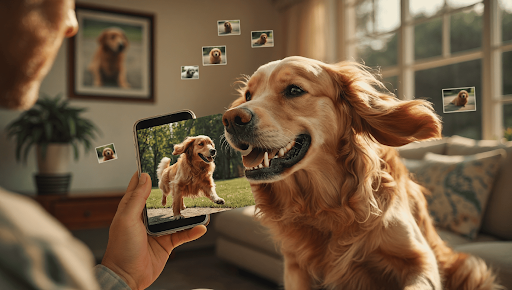
Every pet owner has a camera roll full of almost perfect moments. The dog mid zoomie, slightly blurred. The cat about to knock a glass off the counter, caught one second too late. The head tilt you have seen a thousand times but never quite managed to film.
Pets do not perform on cue, and that is part of why we love them. It is also why so many of the best moments only exist as a memory and a slightly fuzzy photo. An AI Animal Video Generator offers a gentle workaround, and Higgsfield has one that turns a single pet photo into a short moving clip while keeping the breed, color and markings close to the real thing.
Why Are People Turning Pet Photos Into Videos?
Partly because photos are what we actually have. Most of us take dozens of pictures of our pets every week and very little usable video, because by the time the camera is recording, the moment has passed.
There is also an emotional reason. A still photo shows what your dog looks like. A few seconds of movement shows who they are: the wag that starts at the shoulders, the ears that flip inside out, the way they settle into a sunny patch on the rug.
Here are some of the reasons people try it:
- Turning a favorite photo into a birthday or “gotcha day” clip
- Making a funny video to share with family and friends
- Creating a short tribute for a pet who has passed away
- Giving a local pet business something warm and eye catching to post
- Simply seeing a beloved photo come to life for a few seconds
None of these need to be serious productions. Most of the time, they are just small moments of joy.
What Does an AI Animal Video Generator Actually Do?
In simple terms, it creates short animal videos from a written description or a photo.
If you start from a photo of your own pet, the tool uses it as the starting point and adds movement: a run across the grass, a stretch on the sofa, a curious head tilt toward the camera. According to Higgsfield, the breed, color and markings stay close to the photo, so it still looks like your animal rather than a generic dog or cat.
You can also start with words alone. Describe any animal and any setting, a golden retriever on a beach at sunset, a tabby cat watching snow from a windowsill, a parrot on a café counter, and the tool builds the scene from scratch.
A few other things it can do:
- Lifelike motion. Natural walking, fur moving in the wind, wings and tails behaving the way they should.
- Personality. Playful, cute and expressive actions like zoomies or head tilts.
- Sound. Some models generate matching sounds, from barks and birdsong to background ambience.
- Talking animals. Models with native sound can make an animal speak a line from your prompt, which is mostly used for fun.
- Different formats. Vertical for phones and social media, square for feeds, or wide for a laptop screen.
How Do You Get a Clip That Looks Like Your Pet?
The photo you start with matters more than anything else.
The best results tend to come from:
- A clear, well lit photo, ideally taken in daylight
- Your pet’s face and body both visible
- A simple background without clutter
- A natural pose, not one where your pet is half hidden behind a cushion
A blurry photo taken at night will give the tool very little to work with. If you have a few options, pick the one where your pet’s markings are easiest to see.
Then keep the description simple. Something like: “My dog runs happily across a grassy park on a sunny afternoon, ears flapping, tail wagging, then stops and looks at the camera.” One clear action works far better than a long list of things happening at once.
If the first result is not quite right, try again. Higgsfield lets you regenerate with one click, so it costs very little to have another go. Small details can vary between attempts, and the second or third version is often the one that feels most like your pet.
How Do You Make a Clip Step by Step?
If you have never tried it, the whole process takes about as long as making a cup of tea. Here is a simple routine:
- Pick your clearest photo of your pet, ideally in daylight with their whole body visible.
- Open the AI Animal Video Generator on Higgsfield and upload the photo as your starting image.
- Write one or two sentences about what you want to happen, such as running, stretching or looking at the camera.
- Choose a format. Vertical works best for phones and stories, square for feeds.
- Turn on sound if the model supports it and you want barks, purrs or background noise.
- Generate a few versions and keep the one that feels most like your pet.
- Download it and share it with the people who will enjoy it most.
That is really it. The first attempt might be a little off, and that is normal. By the second or third try, most people find a version that makes them smile.
Can You Make a Short Story Starring Your Pet?
Yes, and this is where things get properly fun. Instead of one clip, you make a few short scenes using the same photo, so your pet looks consistent from shot to shot. Higgsfield describes this as generating each shot from the same photo, which keeps the same animal in every cut.
A simple three part story might look like this:
- Your dog waking up on the sofa and stretching
- Your dog trotting proudly down the street with a stick
- Your dog flopping down in the garden, exhausted and happy
Join the clips together in any basic video app, add a little music you are allowed to use, and you have a tiny film about your pet’s perfect day. It makes a lovely birthday surprise for a family member who adores the dog as much as you do.
The same idea works for small businesses. A pet bakery could make a short series of a generated pup “choosing” a treat, as long as it is clearly playful and not passed off as a real customer. An AI Animal Video Generator is at its best when the result is obviously warm, fun and a little bit silly.
Which Ideas Work Best for Pet Owners?
Some ideas simply work better in an AI Animal Video Generator than others. Here are a few that people tend to enjoy:
| Idea | What it looks like | Good for |
| Birthday clip | Your pet bouncing toward the camera with a party background | Sharing with family |
| Seasonal greeting | Your dog in a snowy garden or autumn leaves | Holiday cards and messages |
| “Day in the life” | A short sequence of your pet at home, in the park, asleep | Social media |
| Talking pet | Your cat delivering a dramatic one liner | Making friends laugh |
| Gentle tribute | A calm scene of a pet who has passed, in a favorite spot | Remembering them |
The tribute idea deserves a little care. For some people, seeing a pet move again brings real comfort. For others, it can feel strange. There is no right answer, and it is worth thinking about how you and your family would feel before sharing it widely.
How Can Local Pet Businesses Use It?
Small pet businesses often need a steady stream of friendly content but rarely have time to film it, which is exactly where an AI Animal Video Generator fits. Groomers, dog walkers, pet bakeries, boarding kennels and independent pet shops all fall into this group.
Some realistic ways to use an AI Animal Video Generator:
- Seasonal promotions. A generated golden retriever in a snowy street for a winter grooming offer.
- Opening announcements. A playful clip of animals for a new shop or a new service.
- Event posters brought to life, such as a “pup cup” day or adoption awareness week.
- Short greetings on holidays to keep the business visible on social media.
There is one important line here. If you are a groomer, the before and after photos you share must be real. If you are a dog walker, the dogs you show as clients must be real clients, shared with their owners’ permission. Generated animals are fine for mood and promotion, but they should never stand in for real results or real customers.
The same goes for using customers’ pet photos. Always ask before turning someone else’s pet into a video, even if it is a lovely idea.
What Kind of Prompts Work Well?
Specific and simple. Here are a few examples you could adapt for any AI Animal Video Generator:
- “A fluffy white Samoyed running through fresh snow in a quiet park, morning light, slow camera following from the side.”
- “A ginger cat sitting on a sunny windowsill, slowly blinking, curtains moving in a gentle breeze.”
- “A small brown dachshund trotting down a café terrace, tail up, looking proud, warm afternoon light.”
- “A colorful parrot on a wooden perch tilting its head at the camera, soft indoor light, playful mood.”
Notice the pattern:
- One animal, clearly described
- One main action
- A setting with time of day
- A mood word or two
That pattern works whether you are starting from a photo or from words alone.
Where Do People Share These Clips?
Clips from an AI Animal Video Generator mostly end up in the same places people already share pet photos: family group chats, Instagram, TikTok and Facebook. Pet clips tend to travel well because almost everyone has an opinion about dogs and cats.
For pet owners who have set up a pet camera at home, AI clips are a fun contrast to the real footage. If you have added one as part of a smart home setup, it is worth reading about common smart home installation mistakes and how to avoid them, since a badly placed camera is the most common reason people miss the moments they wanted to catch.
Higgsfield runs in your browser and has a mobile app, so most people make these clips straight from their phone, right next to the photos they have already taken.
What Should You Keep in Mind?
A few honest points help keep it fun and fair:
- A generated clip is not real footage. If it could be mistaken for a real event, say it was made with AI.
- Do not use AI animal videos to sell or rehome animals. Anyone adopting or buying deserves to see the real animal.
- Avoid content that shows animals in distress or danger, even if it is generated.
- Keep children out of generated videos, and only use photos you own or have permission to use.
Higgsfield sits inside a wider AI creative suite, but for most pet owners the animal video tool on its own is all they need. The point is not to replace real moments, just to add a few more.
Final Thoughts
Pets are terrible at posing and wonderful at being themselves, which is why so many of our favorite moments with them never quite make it onto video. A good photo and a short description can now fill some of that gap.
An AI Animal Video Generator lets you turn a favorite picture into a few seconds of movement, whether it is a birthday clip, a silly talking scene or a quiet tribute. Keep it honest, ask before using anyone else’s pet, and enjoy seeing a familiar face come to life. Higgsfield has made that surprisingly simple.
